> ## Documentation Index
> Fetch the complete documentation index at: https://docs.holdstation.com/llms.txt
> Use this file to discover all available pages before exploring further.
# 📖 End-user Tutorial
Holdstation Pay lets you buy **USDT/USDC/USD1 directly with VND in under 30 seconds**, supporting both **BNB Chain** and **Solana**. The process is fully **KYC-compliant** and optimized for user experience. Beyond USDT, users can also **buy tokens, join Launchpad events, and purchase U.S. stocks on-chain using VND**.
### **Prerequisites**
* A registered **Holdstation account**.
* Completed **KYC verification** (required for first-time use).
* Linked **VND payment method** (bank transfer or e-wallet).
## **Step-by-Step Usage**
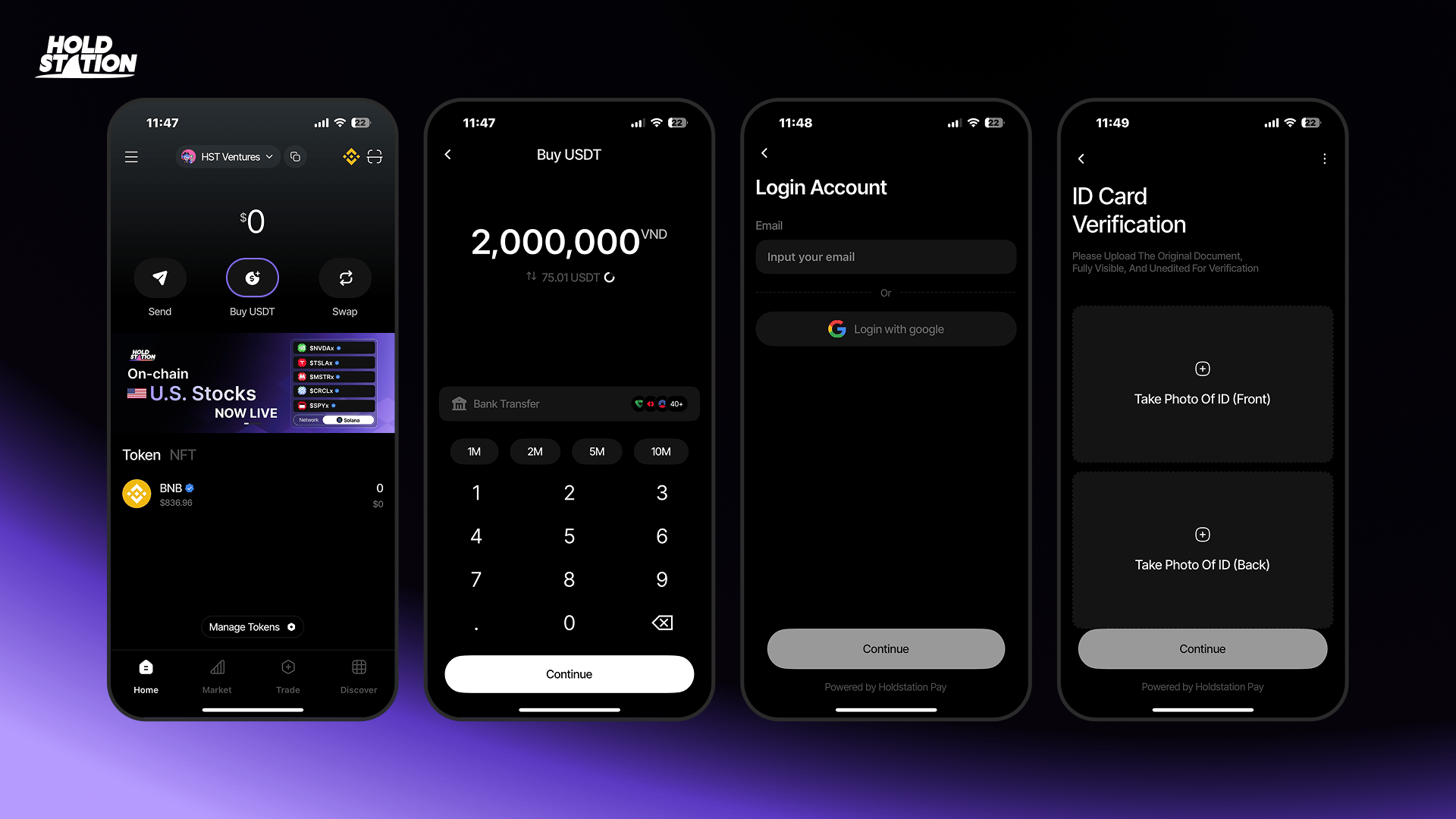 #### 1. Open Holdstation Pay
* Launch the **Holdstation app** and go to the home screen.
#### 2. Select **Buy USDT**
* Tap “Buy USDT.”
* Choose your blockchain: **BNB Chain** or **Solana**.
#### 3. Enter VND Amount
* Input the amount of VND you want to spend.
* The system automatically converts it to **USDT** at the **real-time exchange rate**.
#### 4. Register / Log In
* If new, enter your email to **create an account**.
* If existing, this step is skipped automatically.
#### 5. Complete KYC (if not done)
* Verify your **Vietnamese ID Card (CCCD)** via VNID.
* Upload front and back images of your ID.
* If already verified, the system auto-skips.
#### 1. Open Holdstation Pay
* Launch the **Holdstation app** and go to the home screen.
#### 2. Select **Buy USDT**
* Tap “Buy USDT.”
* Choose your blockchain: **BNB Chain** or **Solana**.
#### 3. Enter VND Amount
* Input the amount of VND you want to spend.
* The system automatically converts it to **USDT** at the **real-time exchange rate**.
#### 4. Register / Log In
* If new, enter your email to **create an account**.
* If existing, this step is skipped automatically.
#### 5. Complete KYC (if not done)
* Verify your **Vietnamese ID Card (CCCD)** via VNID.
* Upload front and back images of your ID.
* If already verified, the system auto-skips.
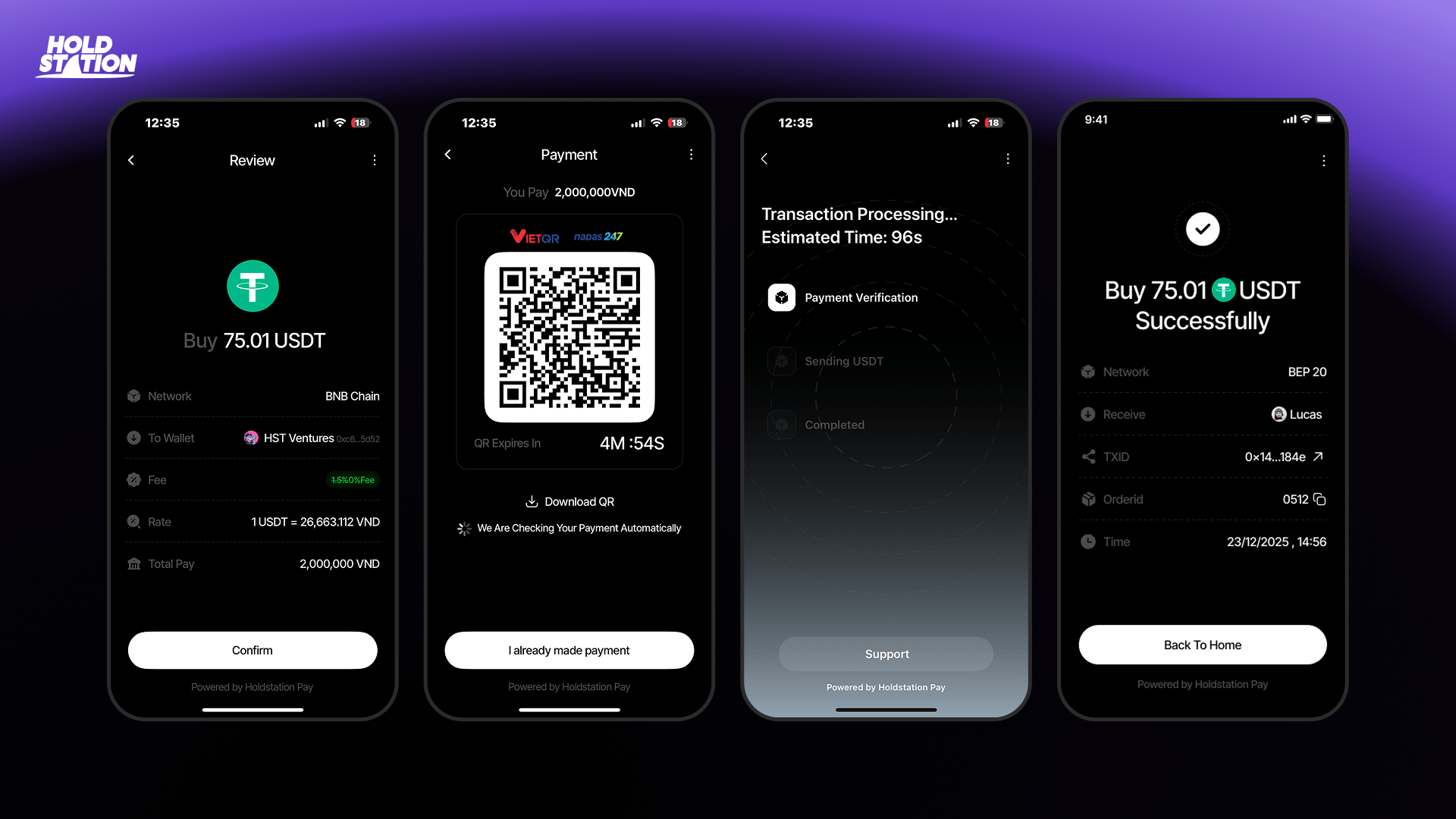 #### 6. Review and Confirm Order
* Check full order details: **VND amount, USDT received, fees, and wallet address**.
* Tap **Confirm** to proceed.
#### 7. Pay via QR Code
* The system generates a **QR Code** for payment.
* Scan the QR and transfer the exact amount with correct details.
* The QR has a time limit — complete payment within the displayed countdown.
#### 8. Transaction Processing
* Once payment is made, the system auto-verifies.
* Status updates in real time: **Payment Verification → Sending USDT → Completed**.
#### 9. Transaction Completed
* Success screen shows: **Network, TXID, Order ID, and Timestamp**.
* Tap **Back to Home** to finish.
* USDT is automatically credited to your **Holdstation wallet**.
## **Additional Features**
* **Buy other tokens**
* **Join Launchpad events**
* **Purchase U.S. Stocks on-chain with VND**\
→ Follow the same process as buying USDT.
## **Tips**
* Enable **2FA** for maximum security.
* Always check **exchange rates and limits** in-app before trading.
* Contact **Support** in-app for any issues.
#### 6. Review and Confirm Order
* Check full order details: **VND amount, USDT received, fees, and wallet address**.
* Tap **Confirm** to proceed.
#### 7. Pay via QR Code
* The system generates a **QR Code** for payment.
* Scan the QR and transfer the exact amount with correct details.
* The QR has a time limit — complete payment within the displayed countdown.
#### 8. Transaction Processing
* Once payment is made, the system auto-verifies.
* Status updates in real time: **Payment Verification → Sending USDT → Completed**.
#### 9. Transaction Completed
* Success screen shows: **Network, TXID, Order ID, and Timestamp**.
* Tap **Back to Home** to finish.
* USDT is automatically credited to your **Holdstation wallet**.
## **Additional Features**
* **Buy other tokens**
* **Join Launchpad events**
* **Purchase U.S. Stocks on-chain with VND**\
→ Follow the same process as buying USDT.
## **Tips**
* Enable **2FA** for maximum security.
* Always check **exchange rates and limits** in-app before trading.
* Contact **Support** in-app for any issues.